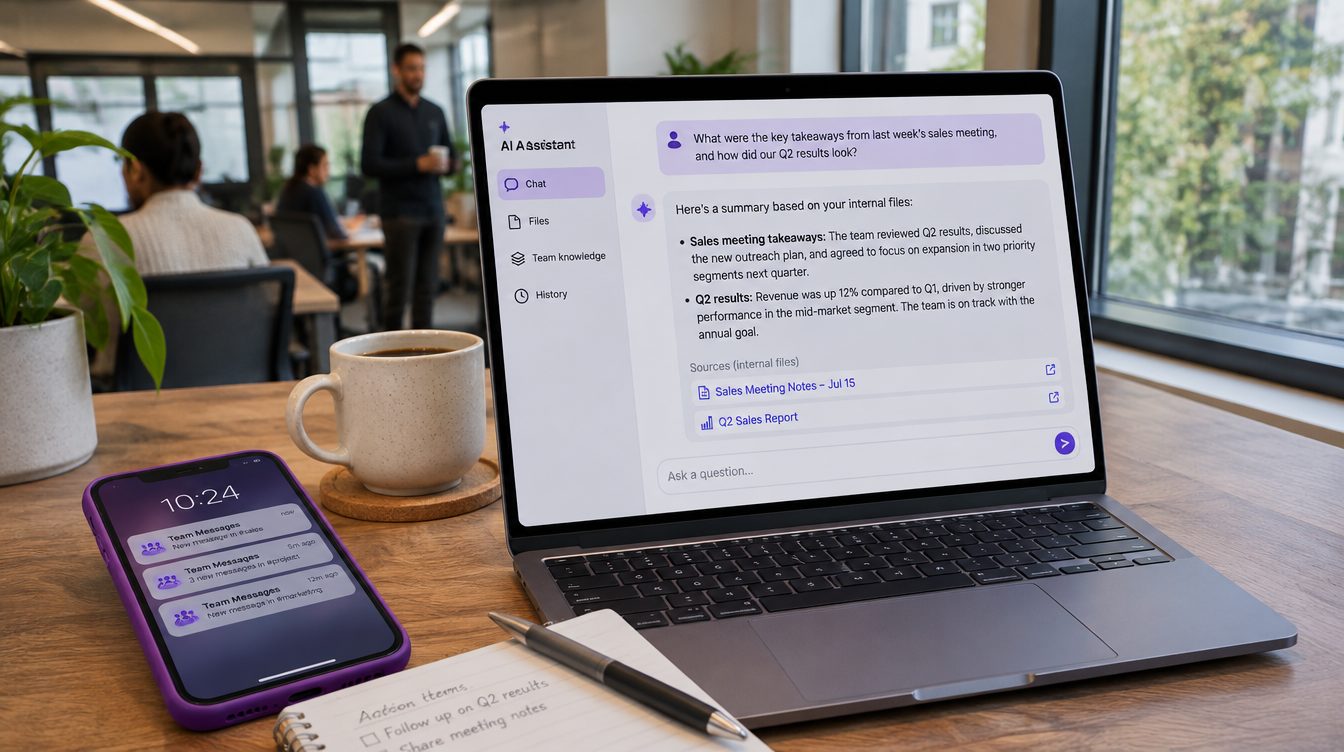
An AI agent is software built on a large language model that uses tools, such as search, your files or your reports, to carry out a task in several steps without a person directing each one. In a business, agents can take on recurring work around information: updating files after meetings, rebuilding reports each morning and flagging numbers that move away from target. Your own developers can build agents, or an outside team can build them for you; Zonder's AI transformation service is one option. Whoever builds them, ask the same things: which sources the agent reads, who can see its answers, how you will know an answer is right, and who trains your team to use it.
What an AI agent is
People use the word for different things. Some mean fully autonomous software that works on its own for long stretches, and some mean software that follows steps set in advance.
Workflows and agents
Anthropic, the company that makes Claude, separates the two in its engineering post Building effective agents, and this section follows its definitions. In a workflow, a model and its tools follow steps written in code ahead of time. In an agent, the model decides its own steps and which tools to use as it goes.
With a workflow, you get predictable, consistent results on well-defined tasks. Agents suit work where the steps can't be predicted and a fixed path can't be written in advance. You would use a workflow for a daily sales report built from the same inputs every morning. A request like "find out why last week's numbers dropped" suits an agent better, because nobody knows the steps until the work starts.
How an agent works
An agent starts with an instruction from a person or a conversation with one. Once the task is clear, it plans and works on its own, and it can come back to the person for more information or a judgment call.
At each step it checks real results, such as what a tool returned, to see whether it is on track. It can pause for a person at checkpoints or when it gets stuck. It is common to add stopping conditions too, such as a maximum number of attempts.
The basic building block is a language model with access to search, tools and memory. In practice, most agents are a model using tools in a loop, adjusting after each result.
Where AI agents help a business
Agents add the most value on tasks that involve both conversation and action, have clear success criteria, allow feedback, and keep a person meaningfully involved. Inside a company, Zonder sets up scheduled agents that update files after meetings, rebuild dashboards each morning and flag numbers that drift from target.
Keeping a company knowledge base current
If your company's knowledge is spread across messages, meeting notes, documents and reports in several tools, Zonder brings it into one knowledge base, organized by team, project and decision. Zonder can connect the places where work happens: Slack, Teams and email; meeting recordings and transcripts; Drive, Box, Confluence and Dropbox; Asana and ClickUp; your CRM and sales calls; support tickets; analytics, ads and finance data; and HR policies and the org chart.
Anyone on the team can ask a question and get an answer that links to the message, meeting or report behind it. People ask things like "How are we tracking against this quarter's targets?", "What did we decide about pricing, and who decided?" and "What changed in my area this week?"
Zonder sets rules for what goes into the knowledge base: every source gets an owner, and freshness rules flag stale content. Each number has one home instead of a separate version in every tool. A log records what was decided and by whom, and common questions are tested every week.
Daily reports and alerts when numbers drift
Each team gets the numbers it needs every morning, without someone building a spreadsheet, and each project owner gets a weekly status summary.
Zonder uses the same setup in its own agency. Client dashboards rebuild every morning, ad budgets are checked against plan every hour, a watchdog tells the team when an automated job didn't finish, and every AI session is archived and searchable. Zonder's content engine drafts new pages every morning, reviews how every page has performed, and rewrites any page AI search cites too little 28 days after it goes live.
Meeting notes to action items
Every call ends with a summary and next steps drafted for approval.
Customer support, as an outside example
Anthropic names customer support as one of two areas where its customers have found particular value in agents. A support agent can pull customer data, order history and help articles, and it can take actions such as issuing refunds or updating tickets. You can measure success by whether the customer's issue was resolved. Zonder connects support tickets to the knowledge base but does not list customer-facing support agents.
| Task | What the agent does | What a person still does |
|---|---|---|
| Knowledge base | Updates files after meetings | Owns each source |
| Daily reports | Rebuilds dashboards each morning | Acts on the numbers |
| Drift alerts | Flags numbers that drift from target | Decides whether to change course |
When an agent is the wrong tool
Start with the simplest setup that works, and add complexity only when it improves results. That can mean not building an agent at all. For many applications, a single well-written request to a model, with the right documents attached, is enough.
Agents often cost more and respond more slowly than simpler setups, in exchange for better task performance. Because agents act on their own, one error can lead to others. Test any agent thoroughly in a safe environment, with limits on what it can touch, before it works on anything real.
Before you choose an agent for a task, ask:
- Do the steps change every time? If they don't, a fixed workflow is cheaper and more predictable.
- Can you tell when the task is done? If you can't define success, you can't check the agent's work.
- What happens if it gets one step wrong? If a mistake is expensive, keep a person approving before anything goes out.
- Will anyone check the results each week? Plan to measure performance and adjust the setup over time.
Who can build AI agents for your business
Whoever builds the agents, plan for training from the start.
Building in-house
If you have developers, they can build agents directly on a model provider's tools. Anthropic suggests developers start by calling the model directly rather than through a framework, since you can write many patterns in a few lines of code. Frameworks exist, including Anthropic's own Claude Agent SDK. They can hide the prompts and responses underneath, which makes problems harder to find, so whoever builds with one should understand the code below it.
The post dates from December 2024, and much of the tooling it describes has changed since.
Hiring an outside team
An outside team can handle the setup, the connections to your tools and the training. Before you hire anyone, ask:
- Which of our sources will the agents read, and who chooses what goes in?
- Will people see information they shouldn't? Each person should only get answers drawn from files they can already open.
- How will we know an answer is right? Every answer should link to its source, and someone should measure how often answers are correct.
- What happens when an automated job fails, and how will we find out?
- Who trains our team, and does each new team get its own session?
- Which AI tools will you use, and will you write down why you chose each one?
How Zonder sets up AI agents
Zonder connects what your company already knows, sets up AI agents that keep it current, and trains your team to use it. Every answer comes with the source it came from.
Zonder starts with one team.
| Step | What happens |
|---|---|
| Pick | One team and the ten questions it asks most |
| Build | Its sources, files, owners and rules |
| Run | Agents, checks and alerts go live |
| Measure | Time to answer, and how often the answer was right |
| Grow | Add the next team, with training |
Zonder mostly uses Claude, connected to the tools your team already uses, picks the tool for each job and writes down why. People only get answers drawn from files they can already open. Every rollout includes hands-on training, so your team knows what to ask and how to check the answer.
Zonder scopes the first team on the first call, after seeing how many sources that team uses.
Frequently Asked Questions
Why not just give everyone ChatGPT?
You can, but AI answers from whatever it happens to read, so two people asking the same question can get two different answers. Without one organized place, decisions are only recorded in chat threads, what was agreed leaves the call with the people who were on it, and every tool holds its own version of the numbers. A knowledge base gives AI one organized, current place to read first, with an owner for every source.
What is the difference between an AI agent and a chatbot?
An agent can use tools and take steps on its own: open a file, search for information, update a record, then check the result and choose what to do next. A customer support agent combines a familiar chat window with tools, so beyond talking to the customer it can look up the order and issue the refund. Ask any vendor which actions their software can take without a person.
Which AI tools does Zonder use, and will people see information they shouldn't?
Zonder mostly uses Claude, connected to the tools your team already uses, such as wherever you keep messages, meeting notes, documents and reports. Zonder picks the tool for each job and writes down why. You do not have to replace the tools your team uses today. People shouldn't see anything they can't see now: in Zonder's setup, people only get answers drawn from files they can already open. Ask anyone you consider to show you how permissions from your existing tools carry over into the answers.
How long does it take to set up agents for a first team?
The answer depends on how many sources that team uses. Zonder scopes it on the first call, after seeing how many there are. Zonder starts with one team and the ten questions it asks most, then sets up that team's sources, files, owners and rules before agents, checks and alerts go live. The next team comes later, with its own training.
Do AI agents make mistakes?
Yes. Because agents act on their own across several steps, one wrong step can lead to more, so test them thoroughly before you trust them with real work. In Zonder's setup, every answer links to its source. In the Measure step, Zonder records how often answers were right, and training covers how to check an answer before you act on it.
Do I need a custom AI agent, or will a simpler tool do?
Often a simpler tool will do. For many applications, a single request to a model with the right documents attached is enough, and a scheduled workflow handles fixed jobs such as a daily report at lower cost. Choose an agent when the steps change each time and nobody can write them down in advance. If you are unsure, start with one team's most common questions and add agents where the simpler setup falls short.
Read more about Zonder's AI transformation service, or book a call to pick your first team.